> ## Documentation Index
> Fetch the complete documentation index at: https://docs.corunner.ai/llms.txt
> Use this file to discover all available pages before exploring further.
# Connect GitLab to Corunner for MR and Pipeline Signals
> Track merge requests, pipelines, and repositories in GitLab. Corunner reads MR signals, pipeline health, and review load using a personal access token.
GitLab is a Direct Connection that lets Corunner read merge requests, pipelines, and repositories. Once connected, agents use it for MR signals, pipeline health, and review-load insights.
## What Corunner does with GitLab
Agents track open merge requests, watch pipeline runs for failures and flakiness, and surface review-load imbalances so nobody becomes a bottleneck. Commit history feeds context when the Debug/Diagnostics Agent correlates recent changes with incidents.
## What you get
* Read repos
* Read merge requests
* Read pipelines
* Read commits
## Authentication
Connect with a **personal access token** from GitLab. Create the token with the required read scopes, then paste it into the connection card in Corunner.
## What breaks if you disconnect
* MR signals
* Pipeline health
## Manage this connection
Open **Integrations** in the Corunner web app, then find **GitLab** under the **Direct Connections** tab.
## Connect GitLab
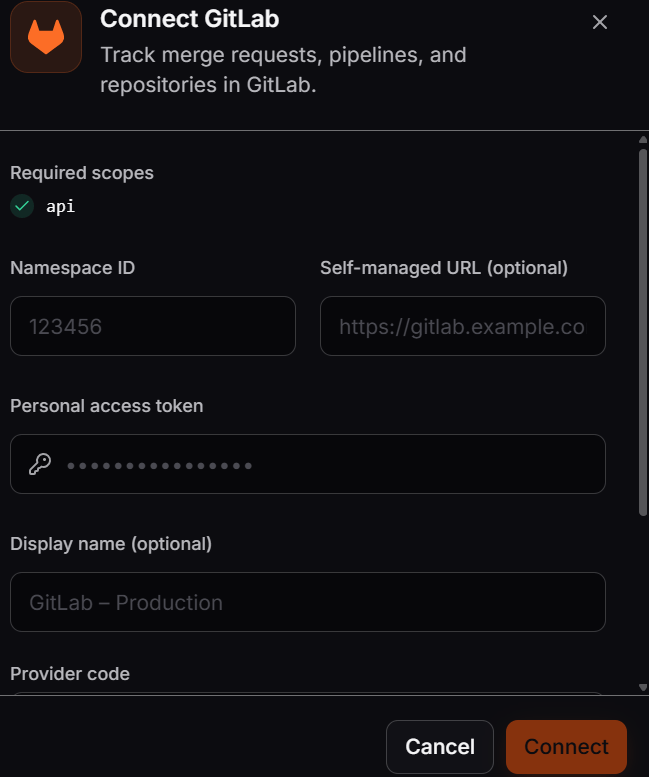
Enter the GitLab connection details in the **Connect GitLab** dialog. The required `api` scope lets Corunner read repositories, merge requests, pipelines, and commits.
 The credential is encrypted at rest and used only for the scopes shown. Corunner verifies it when you connect. If the credential is invalid, an error appears in the dialog.
[**Create a personal access token in GitLab**](https://gitlab.com/-/profile/personal_access_tokens)
Enter the numeric ID of the GitLab namespace you want Corunner to access.
If you use a self-managed GitLab instance, enter its base URL. Leave this field empty when you use GitLab.com.
Paste a GitLab personal access token with the required `api` scope.
Optionally add a display name and provider code, then click **Connect**. Corunner verifies the credential immediately.
The credential is encrypted at rest and used only for the scopes shown. Corunner verifies it when you connect. If the credential is invalid, an error appears in the dialog.
[**Create a personal access token in GitLab**](https://gitlab.com/-/profile/personal_access_tokens)
Enter the numeric ID of the GitLab namespace you want Corunner to access.
If you use a self-managed GitLab instance, enter its base URL. Leave this field empty when you use GitLab.com.
Paste a GitLab personal access token with the required `api` scope.
Optionally add a display name and provider code, then click **Connect**. Corunner verifies the credential immediately.